Case Study
A Self-Hosted Finance PWA, Designed and Shipped Solo
No consumer finance tool fit how I think about money. So I built the one that does.
Design Engineering
Information Architecture
AI-Assisted Build
Full-Stack PWA
Self-Hosted Infrastructure
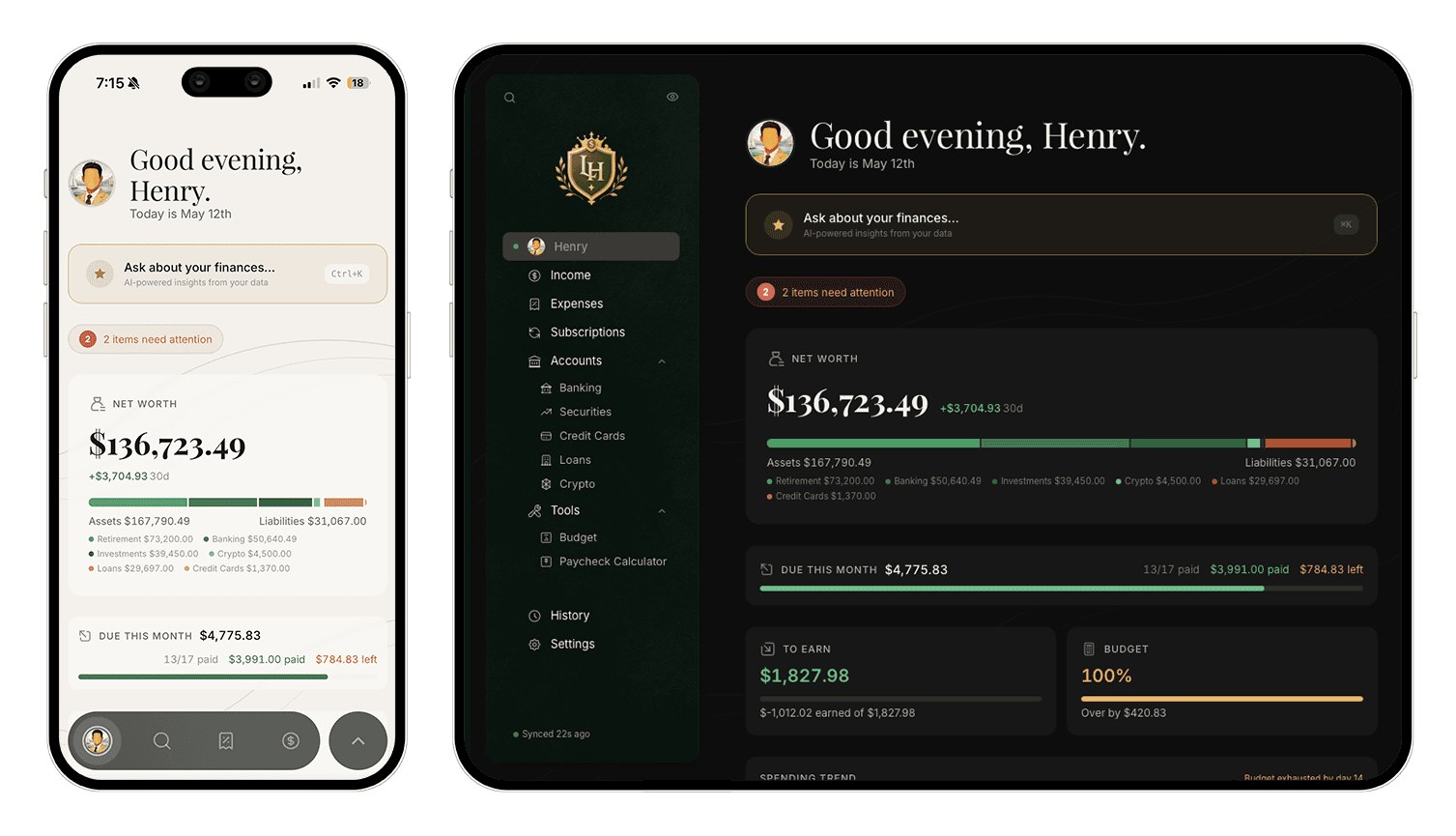
60+ → 8
tables grouped into domains
60+ → 8
tables grouped into domains
8wks
evenings and weekends
8wks
evenings and weekends
250+
API endpoints
250+
API endpoints
39
database tables, in production
39
database tables, in production
My Role
Designer, full-stack engineer, daily user
Timeline
8 weeks of nights and weekends
Team
Solo, with Claude as engineering partner
Tools
Claude Code, Figma, React, Express, SQLite, Docker
Scope
Self-hosted PWA, mobile and desktop
01 - The Problem
12 spreadsheets pretending to be an app
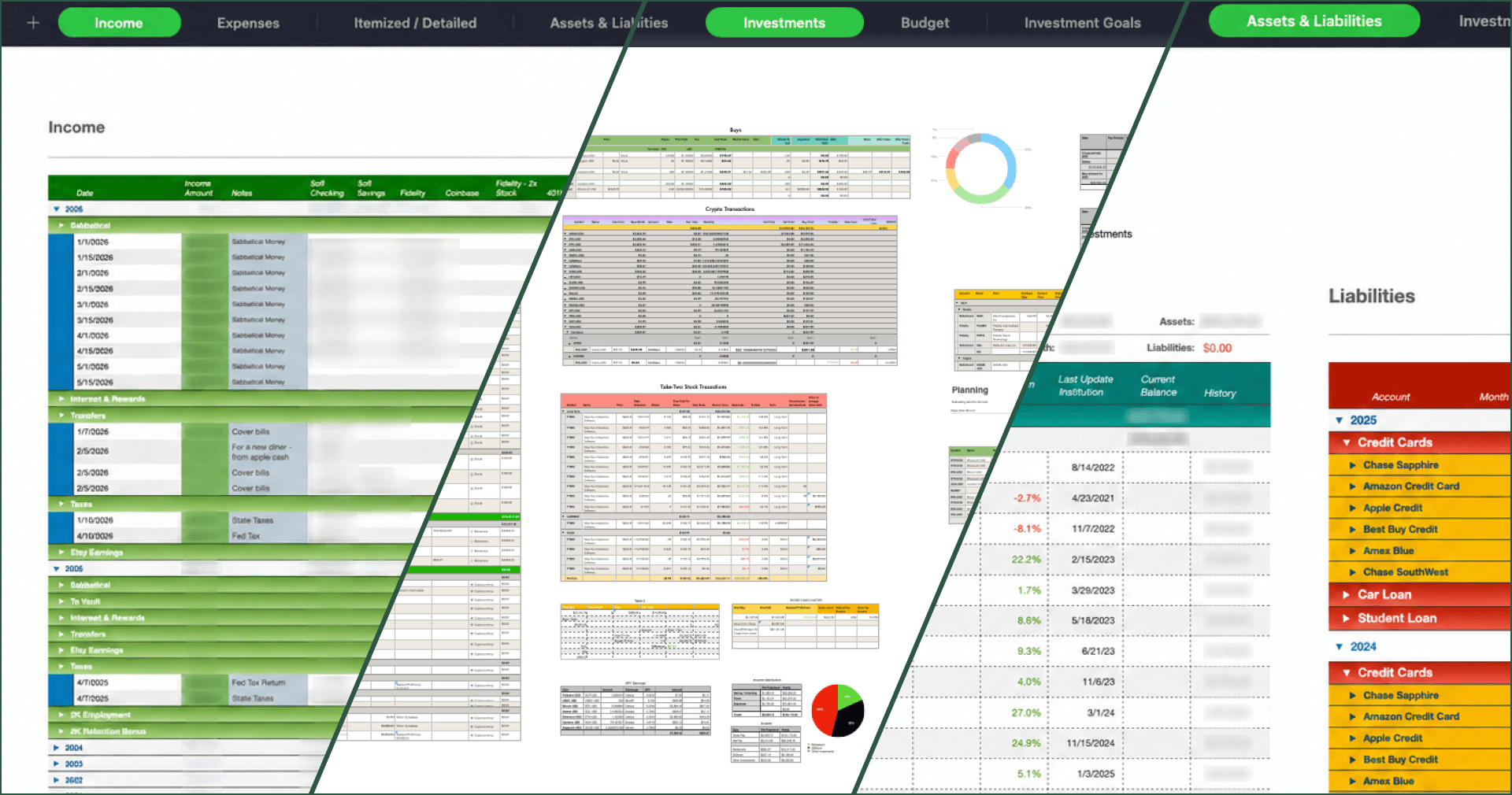
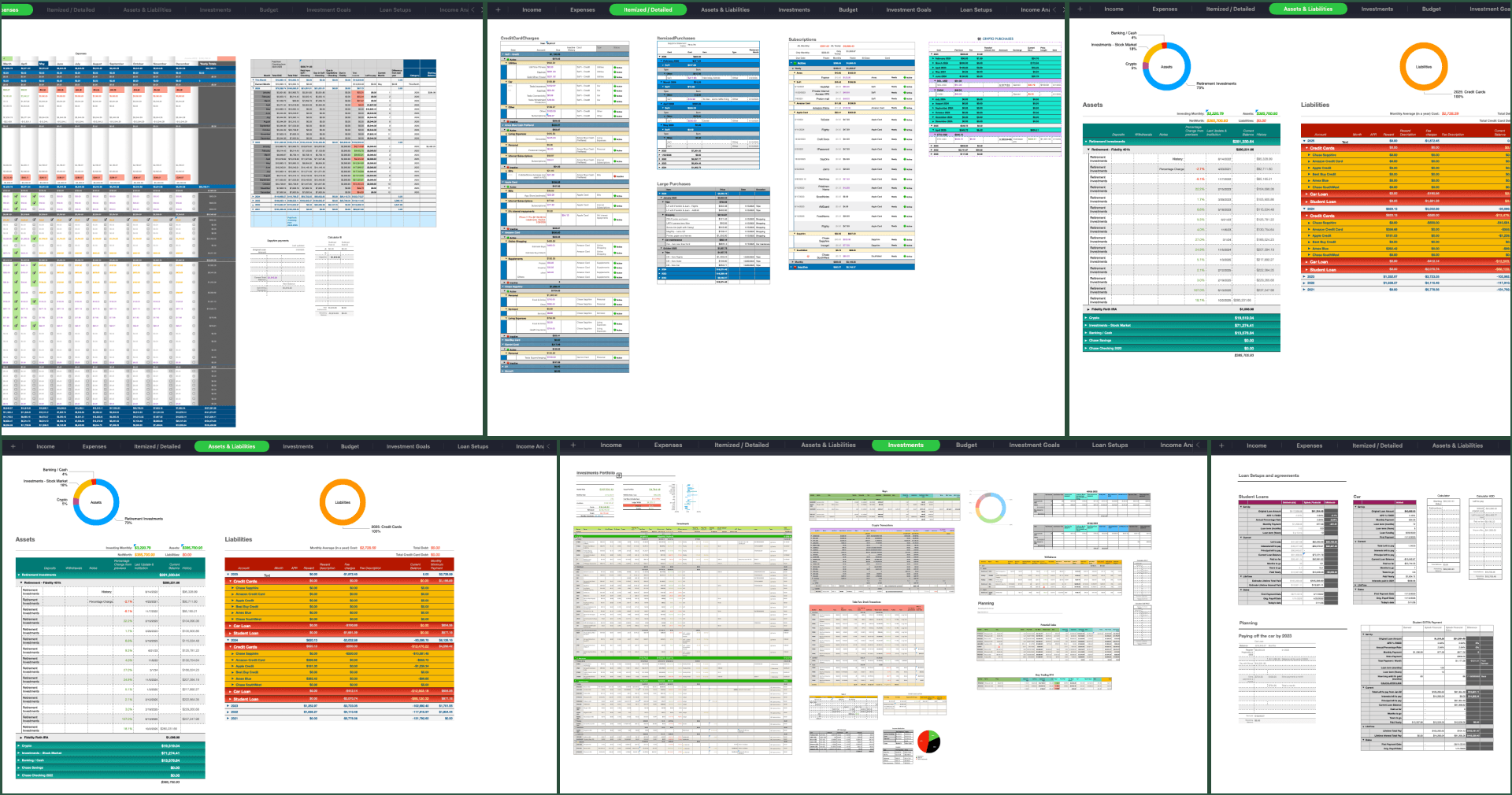
I've been tracking my finances in Apple Numbers for years, across 12 sheet tabs and 60+ sub tables: income, expenses, itemized purchases, assets, liabilities, investments, budget, loans, credit cards, crypto staking, and an archive of everything that didn't fit anywhere else. Cross sheet formulas held it together. It worked, in the sense that nothing else did, but it wasn't an app. No mobile, no quick capture, no shared logic between views, and every new account meant another column in another sheet.
I tried the consumer options like Mint before it shut down, YNAB, Monarch, and Copilot, but none of them handled how I actually move money, which is income distributed across multiple accounts by purpose, not all of it landing in one checking account first. Self hosting wasn't on the table either, which mattered because I didn't want my full financial picture sitting on someone else's server. So I built it.
01 - The Problem
12 spreadsheets pretending to be an app
I've been tracking my finances in Apple Numbers for years, across 12 sheet tabs and 60+ sub tables: income, expenses, itemized purchases, assets, liabilities, investments, budget, loans, credit cards, crypto staking, and an archive of everything that didn't fit anywhere else. Cross sheet formulas held it together. It worked, in the sense that nothing else did, but it wasn't an app. No mobile, no quick capture, no shared logic between views, and every new account meant another column in another sheet.
I tried the consumer options like Mint before it shut down, YNAB, Monarch, and Copilot, but none of them handled how I actually move money, which is income distributed across multiple accounts by purpose, not all of it landing in one checking account first. Self hosting wasn't on the table either, which mattered because I didn't want my full financial picture sitting on someone else's server. So I built it.
02 - Information Architecture
From 12 sheets to one clean navigation
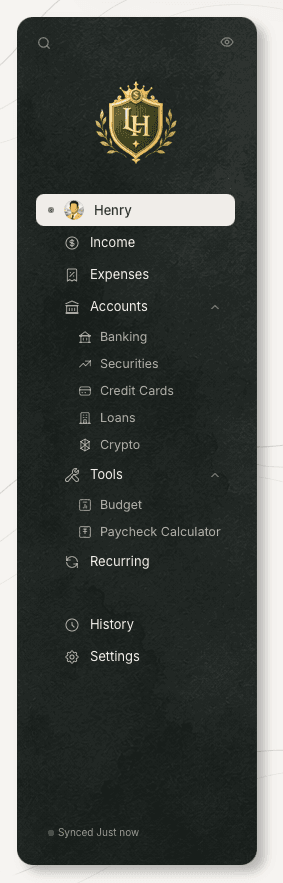
The first job was figuring out which of those tables were actually distinct domains, which were duplicates with different framing, and which were just artifacts of how I'd organized things over the years. A domain here just means a kind of financial data, like income or a loan, separate from where it lives in the nav. I audited every table and grouped them into eight core data domains, then worked out the hierarchies and primary actions for each. Accounts became the parent route. Banking, investments, credit cards, loans, and crypto all live inside it as filter views, so the sidebar stays focused and I still have access to everything underneath.
BEFORE
Sheets in Apple Numbers
Cross-sheet formulas, no mobile editing, no audit trail. Worked fine for years, until it didn't.
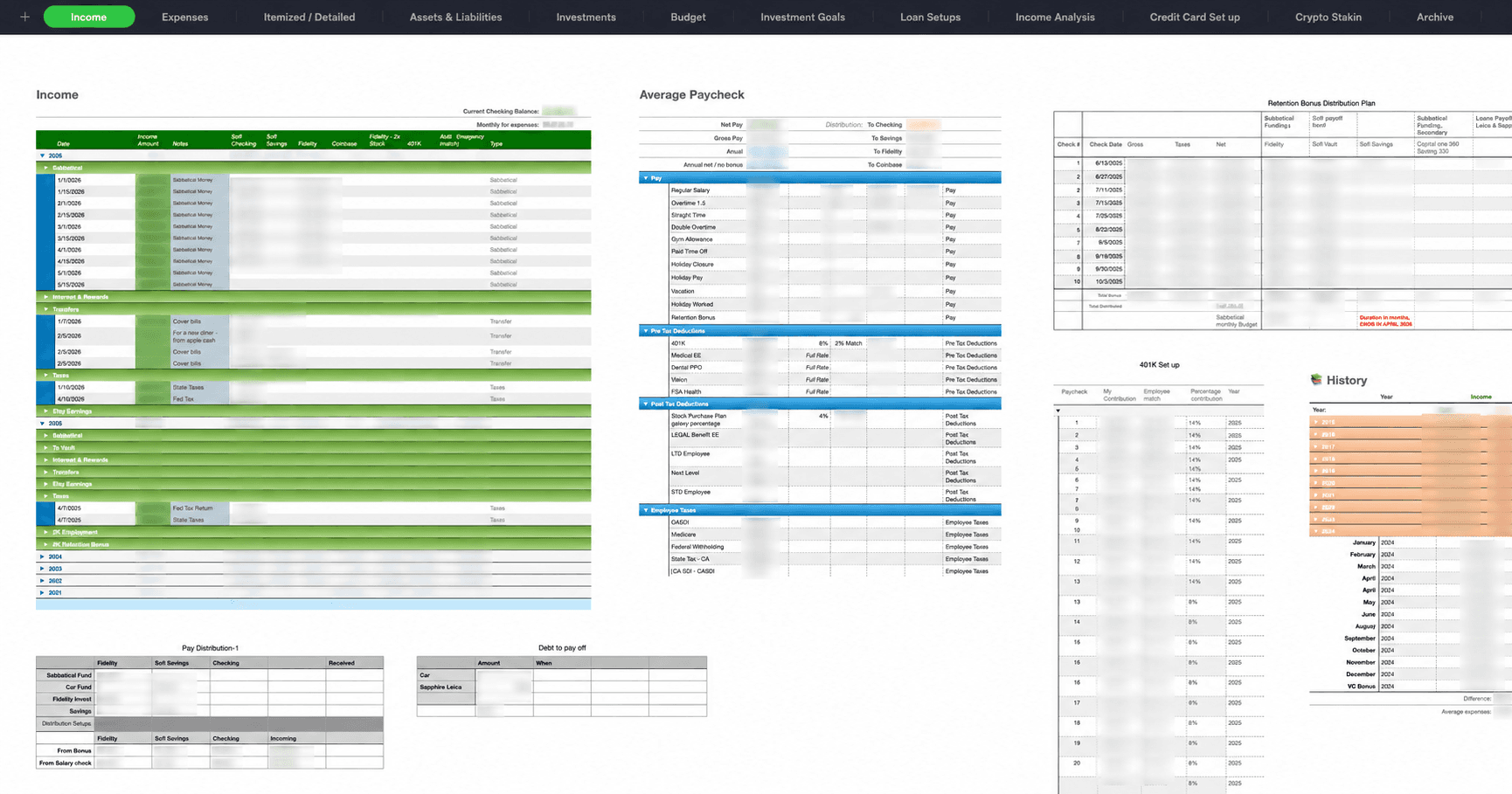
60+
Tables across 12 sheets
Income, Expenses, Itemized, Assets, Investments, Budget,
Goals, Loans, Income Analysis, Credit Cards, Crypto, Archive
PROCESS
Audit and consolidate
Grouped sheets by function, not by name. Found 8 domains and natural hierarchies.
01
Audit all 12 sheets
Grouped by function, not by name. Mapped what each sheet actually did.
02
Identify 8 data domains
Income, Expenses, Budget, Banking, Investments, Credit Cards, Loans, Crypto
03
Find natural hierarchies
Banking, Investments, Credit Cards, Loans, and Crypto. They live under one parent.
04
Define primary actions
Per domain, named the one most common task. That drove what got bottom nav real estate.
AFTER
Navigation model
8 bottom nav items. 14 total routes. Accounts is the umbrella for 5 financial types. More holds secondary destinations.
Dashboard
Net worth, bills, budget, alerts
Income
Record and distribute
Expenses
Monthly grid, pay and unpay, categories
Recurring
Recurring CC charges
Accounts
All account types, balances, transactions
├─
Banking
Checking, savings
├─
Investments
Brokerage, retirement
├─
Credit Cards
Accounts, statements, rewards
└─
Loans
Amortization, payoff calculators
└─
Crypto
Crypto accounts, staking tracking
Tools
Secondary destinations
History
Audit trail with undo
├─
Budget
Monthly goal, category breakdown, scenarios
├─
Paycheck Calculator
Calculates the distribution of a paycheck
Settings
Theme, user, data
8
bottom nav items
14
routes total
8
data domains
02 - Information Architecture
From 12 sheets to one clean navigation
The first job was figuring out which of those tables were actually distinct domains, which were duplicates with different framing, and which were just artifacts of how I'd organized things over the years. A domain here just means a kind of financial data, like income or a loan, separate from where it lives in the nav. I audited every table and grouped them into eight core data domains, then worked out the hierarchies and primary actions for each. Accounts became the parent route. Banking, investments, credit cards, loans, and crypto all live inside it as filter views, so the sidebar stays focused and I still have access to everything underneath.
BEFORE
Sheets in Apple Numbers
Cross-sheet formulas, no mobile editing, no audit trail. Worked fine for years, until it didn't.
60+
Tables across 12 sheets
Income, Expenses, Itemized, Assets, Investments, Budget,
Goals, Loans, Income Analysis, Credit Cards, Crypto, Archive
PROCESS
Audit and consolidate
Grouped sheets by function, not by name. Found 8 domains and natural hierarchies.
01
Audit all 12 sheets
Grouped by function, not by name. Mapped what each sheet actually did.
02
Identify 8 data domains
Income, Expenses, Budget, Banking, Investments, Credit Cards, Loans, Crypto
03
Find natural hierarchies
Banking, Investments, Credit Cards, Loans, and Crypto. They live under one parent.
04
Define primary actions
Per domain, named the one most common task. That drove what got bottom nav real estate.
AFTER
Navigation model
8 bottom nav items. 14 total routes. Accounts is the umbrella for 5 financial types. More holds secondary destinations.
Dashboard
Net worth, bills, budget, alerts
Income
Record and distribute
Expenses
Monthly grid, pay and unpay, categories
Recurring
Recurring CC charges
Accounts
All account types, balances, transactions
├─
Banking
Checking, savings
├─
Investments
Brokerage, retirement
├─
Credit Cards
Accounts, statements, rewards
└─
Loans
Amortization, payoff calculators
└─
Crypto
Crypto accounts, staking tracking
Tools
Secondary destinations
History
Audit trail with undo
├─
Budget
Monthly goal, category breakdown, scenarios
├─
Paycheck Calculator
Calculates the distribution of a paycheck
Settings
Theme, user, data
8
bottom nav items
14
routes total
8
data domains
03 - The Design System
Old money, not Robinhood
The first decision was what this app shouldn't look like. Robinhood and most fintech apps lean on bright gradients, dark glassmorphism, and screens that feel like a casino dashboard. I wanted the opposite, something closer to an old bank ledger or a private wealth client portal. Deep forest green as the primary accent, coral for expenses, liabilities, and overdue states, because red gets fatiguing on a finance app you open every day. Red still exists in the system, but only for errors and alerts, never for money that's just negative.
Ledger House
Design System · Specimen
Net Worth
$47,329.18
+ $1,284.50 this month
Forest
#3D6B4F
Primary accent
Coral
#ED9474
Expenses, liabilities
Gold
#DEB46A
Income, autopay badges
Red
#EC6060
Errors, alerts only
Salary deposit
· Income
+ $2,400.00
Whole Foods Market
· Groceries
− $87.42
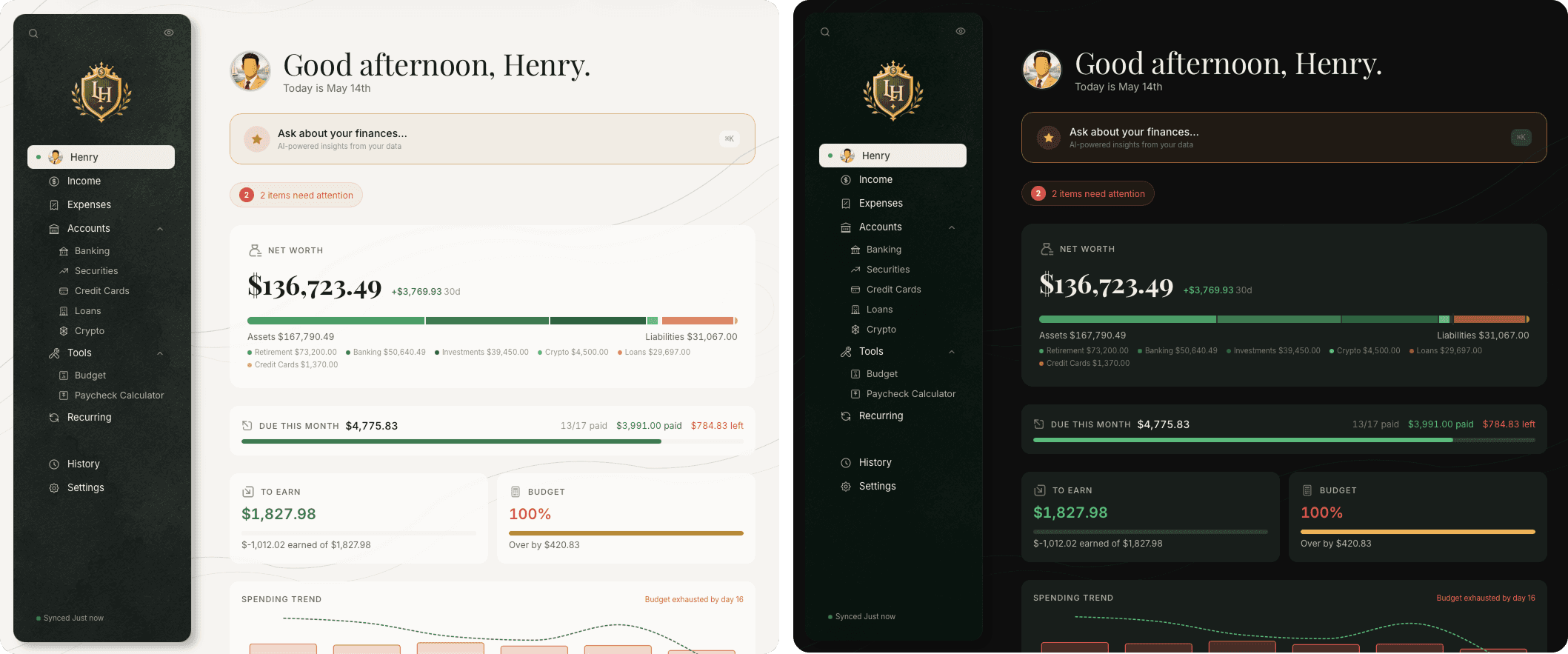
I'm using two typefaces, and each one has a specific job. Inter handles everything functional like body, labels, buttons, and most numbers. Playfair Display is reserved for one place only, the Dashboard's hero net worth number, which is the single editorial moment in the whole app. The sidebar carries identity a different way, through the Ledger House shield logo rather than a typed wordmark, so the type system itself stays purely functional. Numbers use tabular nums everywhere so columns line up at a glance, with the same hierarchy across every screen, Playfair on the Dashboard hero, Inter Medium tabular for tables and lists, Inter Regular smaller for metadata. The eye always knows where to land first. No glassmorphism, no animated gradients, no celebration confetti when you log a transaction. Dark and light modes both shipped from day one, and both meet WCAG AA contrast at minimum, AAA where I could get there without breaking the visual system.
03 - The Design System
Old money, not Robinhood
The first decision was what this app shouldn't look like. Robinhood and most fintech apps lean on bright gradients, dark glassmorphism, and screens that feel like a casino dashboard. I wanted the opposite, something closer to an old bank ledger or a private wealth client portal. Deep forest green as the primary accent, coral for expenses, liabilities, and overdue states, because red gets fatiguing on a finance app you open every day. Red still exists in the system, but only for errors and alerts, never for money that's just negative.
Ledger House
Design System · Specimen
Net Worth
$47,329.18
+ $1,284.50 this month
Forest
#3D6B4F
Primary accent
Coral
#ED9474
Expenses, liabilities
Gold
#DEB46A
Income, autopay badges
Red
#EC6060
Errors, alerts only
Salary deposit
· Income
+ $2,400.00
Whole Foods Market
· Groceries
− $87.42
I'm using two typefaces, and each one has a specific job. Inter handles everything functional like body, labels, buttons, and most numbers. Playfair Display is reserved for one place only, the Dashboard's hero net worth number, which is the single editorial moment in the whole app. The sidebar carries identity a different way, through the Ledger House shield logo rather than a typed wordmark, so the type system itself stays purely functional. Numbers use tabular nums everywhere so columns line up at a glance, with the same hierarchy across every screen, Playfair on the Dashboard hero, Inter Medium tabular for tables and lists, Inter Regular smaller for metadata. The eye always knows where to land first. No glassmorphism, no animated gradients, no celebration confetti when you log a transaction. Dark and light modes both shipped from day one, and both meet WCAG AA contrast at minimum, AAA where I could get there without breaking the visual system.
04 - A Pattern
Splitting a paycheck without losing a cent
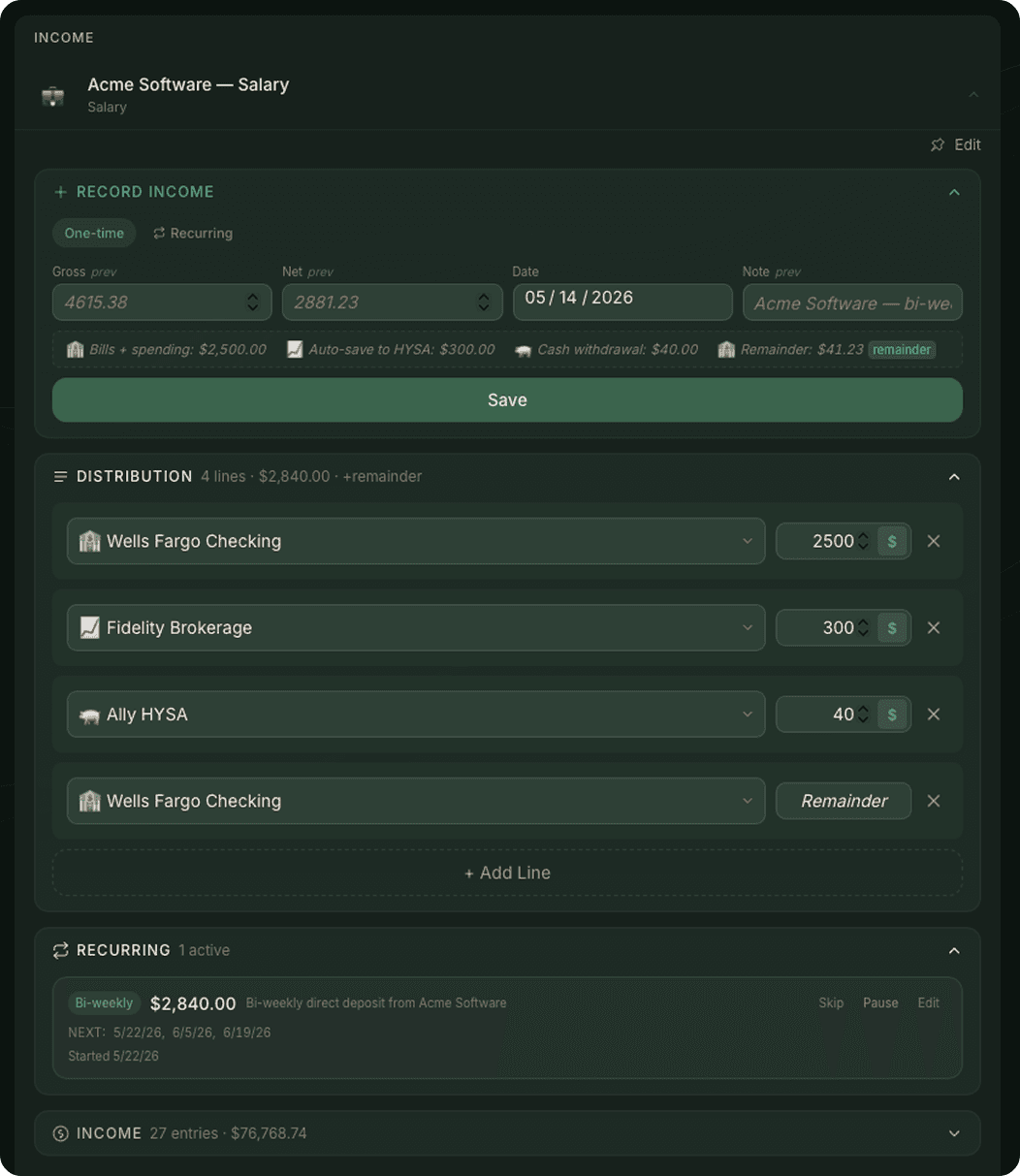
Most finance apps assume your paycheck lands in checking and you spend from there. Mine doesn't. I split each paycheck across multiple accounts by purpose, like savings, vacation fund, investments, and checking, and the percentages stay roughly constant month to month. The pattern works like this: you create a bubble for an income source, that bubble references a template for how to split it, the template is editable per paycheck so you can adjust for a one off bonus, and on confirm the split locks in.
04 - A Pattern
Splitting a paycheck without losing a cent
Most finance apps assume your paycheck lands in checking and you spend from there. Mine doesn't. I split each paycheck across multiple accounts by purpose, like savings, vacation fund, investments, and checking, and the percentages stay roughly constant month to month. The pattern works like this: you create a bubble for an income source, that bubble references a template for how to split it, the template is editable per paycheck so you can adjust for a one off bonus, and on confirm the split locks in.
05 · What got built
Beyond the dashboard
Most of the design work lived past the dashboard. Stepped imports, automated snapshots, a privacy shield for shoulder-surfing, an AI you can ask about your money. The features you don't see until you're using the app every day.
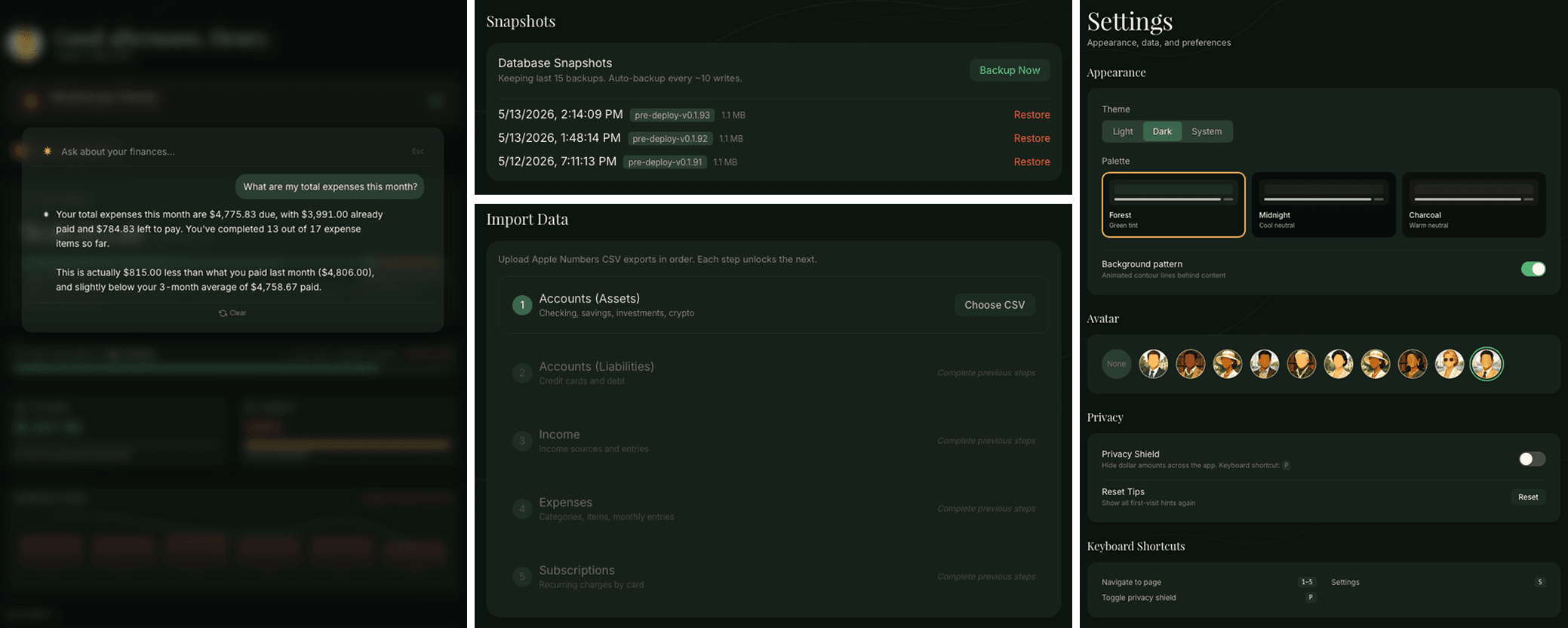
Ask the data Plain-English questions against my actual transactions, accounts, and budgets. The Anthropic key lives in Settings, so the data stays on my server.
Auto snapshots Database backup every ten writes. The last fifteen are kept on disk, every one restorable from Settings in two clicks.
Stepped imports CSV migration from Apple Numbers, broken into five sequential steps. Each step unlocks the next, so dependencies can't get out of order.
Privacy Shield Blur every dollar amount in the app with one keyboard shortcut. For when someone's looking over your shoulder, or for screenshots like this one.
Three palettes Forest, Midnight, and Charcoal. Light and dark variants for each, so the app feels right at any hour.
Keyboard shortcuts Single-key navigation across the whole app. Built for daily use, not first-time tours.
05 · What got built
Beyond the dashboard
Most of the design work lived past the dashboard. Stepped imports, automated snapshots, a privacy shield for shoulder-surfing, an AI you can ask about your money. The features you don't see until you're using the app every day.
Ask the data Plain-English questions against my actual transactions, accounts, and budgets. The Anthropic key lives in Settings, so the data stays on my server.
Auto snapshots Database backup every ten writes. The last fifteen are kept on disk, every one restorable from Settings in two clicks.
Stepped imports CSV migration from Apple Numbers, broken into five sequential steps. Each step unlocks the next, so dependencies can't get out of order.
Privacy Shield Blur every dollar amount in the app with one keyboard shortcut. For when someone's looking over your shoulder, or for screenshots like this one.
Three palettes Forest, Midnight, and Charcoal. Light and dark variants for each, so the app feels right at any hour.
Keyboard shortcuts Single-key navigation across the whole app. Built for daily use, not first-time tours.
06 - The Build
Directing AI to ship production software
The whole thing was built solo, with Claude as the implementation partner. The setup is three roles: I'm the product designer and decision maker, Claude Chat is the thinking partner for architecture and tradeoffs, and Claude Code is the engineer.
I ran two instances of Claude in parallel. A chat session for planning, where I'd talk through what I wanted to build and walk away with a clear prompt, which I'd then hand off to Claude Code in the editor. After Code shipped something, I'd cross check the result back in the chat session, and more often than not it caught issues that would've slipped past me if I'd only been working with Code.
Claude Code wanted to hardcode everything. Every color a literal hex, every spacing a magic number, every radius re-declared from scratch. The fix was writing 'use the design system, no hardcoded values' as a rule in claude.md and auditing every component diff against it. Without that constraint, the first build would have shipped two hundred unique colors and zero tokens.
I asked Claude Code to audit each implementation rigorously, then tested everything myself in real use. Bugs I ran into went into a running notepad, then through Claude Chat to figure out the right fix before going back to Code. A claude.md file at the project root stays current with progress, decisions, and implemented features, so both Claude sessions and I are working from one source of truth.
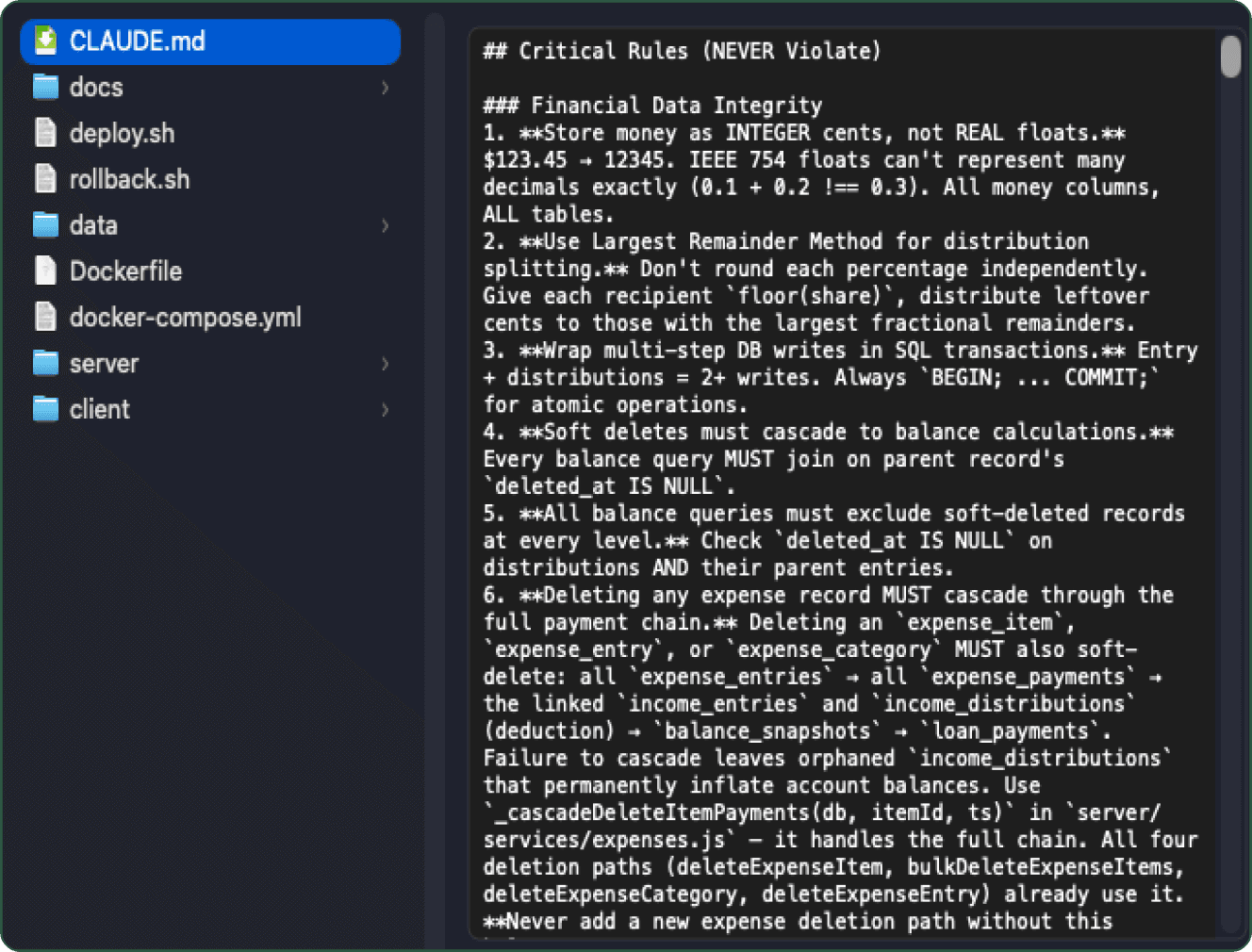
Single source of truth: architecture decisions, conventions, recent changes, and open questions, shared across every Claude session."
06 - The Build
Directing AI to ship production software
The whole thing was built solo, with Claude as the implementation partner. The setup is three roles: I'm the product designer and decision maker, Claude Chat is the thinking partner for architecture and tradeoffs, and Claude Code is the engineer.
I ran two instances of Claude in parallel. A chat session for planning, where I'd talk through what I wanted to build and walk away with a clear prompt, which I'd then hand off to Claude Code in the editor. After Code shipped something, I'd cross check the result back in the chat session, and more often than not it caught issues that would've slipped past me if I'd only been working with Code.
Claude Code wanted to hardcode everything. Every color a literal hex, every spacing a magic number, every radius re-declared from scratch. The fix was writing 'use the design system, no hardcoded values' as a rule in claude.md and auditing every component diff against it. Without that constraint, the first build would have shipped two hundred unique colors and zero tokens.
I asked Claude Code to audit each implementation rigorously, then tested everything myself in real use. Bugs I ran into went into a running notepad, then through Claude Chat to figure out the right fix before going back to Code. A claude.md file at the project root stays current with progress, decisions, and implemented features, so both Claude sessions and I are working from one source of truth.
Single source of truth: architecture decisions, conventions, recent changes, and open questions, shared across every Claude session."
Shipped and proven
07 - Outcomes
Ledger House is in production as a self hosted PWA on my Synology NAS via Docker, with React 19 on the front end, Express on the API, and SQLite for storage. By the numbers: 12 spreadsheets and 60+ tables turned into 14 routes and 39 database tables, with 250+ API endpoints. The whole thing took eight weeks of evenings and weekends.
1
Person
14
Routes
250+
Endpoints
39
Tables
8
Weeks
What this case study actually proves is the part that's harder to show on a portfolio. I can take a vague personal problem, work out the information architecture, design the system, build the system, ship the system, and live with the consequences. The design decisions had to survive contact with implementation and contact with daily use. The ones that didn't, I changed.
Shipped and proven
07 - Outcomes
Ledger House is in production as a self hosted PWA on my Synology NAS via Docker, with React 19 on the front end, Express on the API, and SQLite for storage. By the numbers: 12 spreadsheets and 60+ tables turned into 14 routes and 39 database tables, with 250+ API endpoints. The whole thing took eight weeks of evenings and weekends.
1
Person
14
Routes
250+
Endpoints
39
Tables
8
Weeks
What this case study actually proves is the part that's harder to show on a portfolio. I can take a vague personal problem, work out the information architecture, design the system, build the system, ship the system, and live with the consequences. The design decisions had to survive contact with implementation and contact with daily use. The ones that didn't, I changed.
Shipped and proven
07 - Outcomes
Ledger House is in production as a self hosted PWA on my Synology NAS via Docker, with React 19 on the front end, Express on the API, and SQLite for storage. By the numbers: 12 spreadsheets and 60+ tables turned into 14 routes and 39 database tables, with 250+ API endpoints. The whole thing took eight weeks of evenings and weekends.
1
Person
14
Routes
250+
Endpoints
39
Tables
8
Weeks
What this case study actually proves is the part that's harder to show on a portfolio. I can take a vague personal problem, work out the information architecture, design the system, build the system, ship the system, and live with the consequences. The design decisions had to survive contact with implementation and contact with daily use. The ones that didn't, I changed.
© 2026 by Albert Carmona
© 2026 by Albert Carmona
© 2026 by Albert Carmona